ChatGPT Ads news: the September 2026 update explained
OpenAI's September ChatGPT Ads update — oCPM conversion campaigns, an official Shopify app, platform targeting and Event Quality Score, checked in the panel.
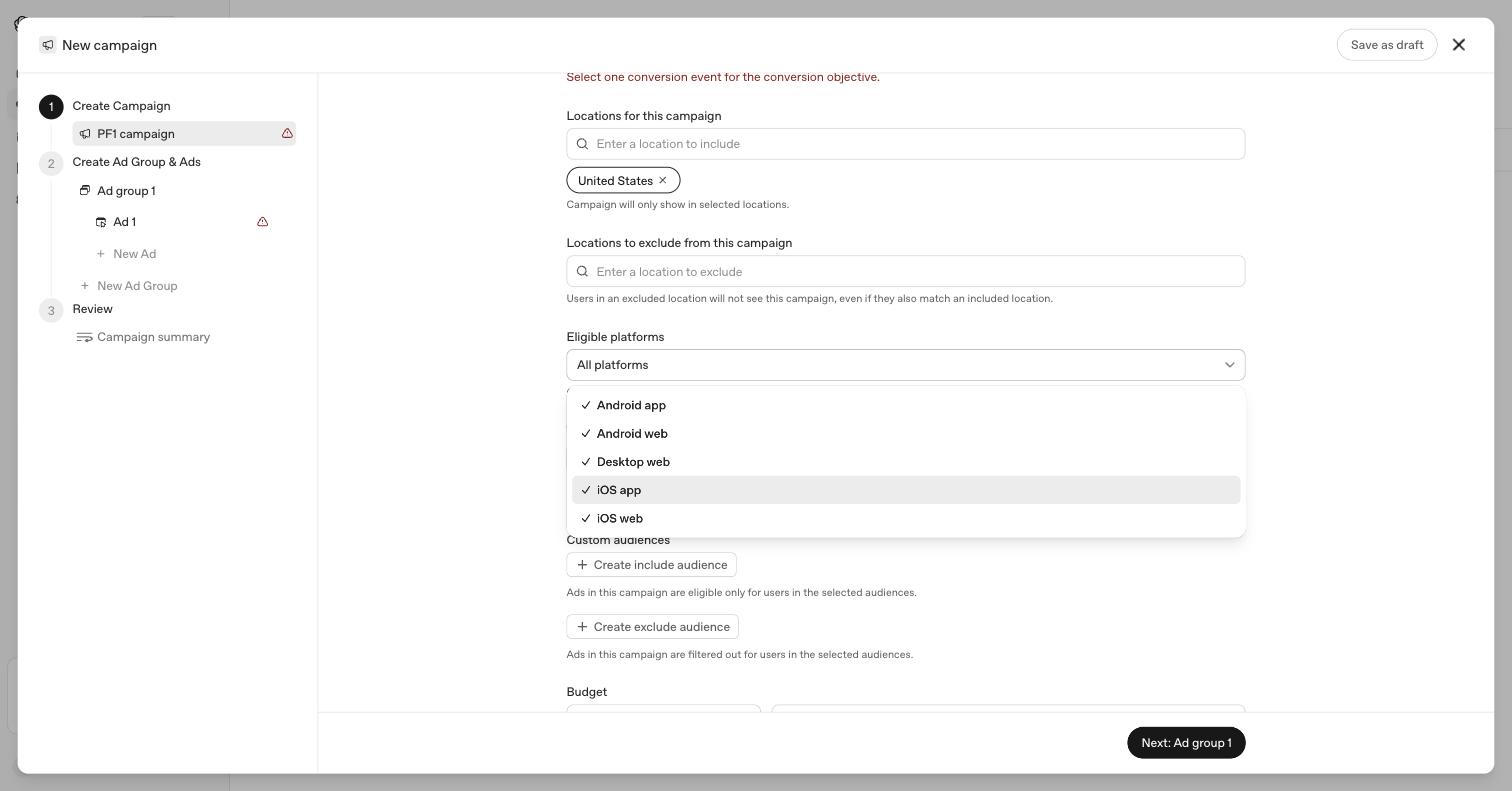
OpenAI's latest product email lists nine changes to ChatGPT Ads. Some of them are already visible in Ads Manager, one is only partly true in the panel, and two change advice published on this site in the last few weeks.
Rather than repeat the announcement, this goes through each change with what the panel actually shows today and what it means if you sell online.
The short version#
| Change | Status | Matters most to |
|---|---|---|
| Conversion campaigns billed by impressions | Generally available | Anyone optimising for sales |
| Flexible attribution windows | Available | Anyone comparing numbers |
| Five separate platforms to target | Live in the panel | Stores with mobile checkout issues |
| Official Shopify app | US now, international later this month | Shopify merchants |
| HubSpot integration | Available | Lead-generation businesses |
| AI-suggested ad copy and images | In testing | Anyone writing ads |
| Text customization | Still on by default in the panel | Everyone |
| Event Quality Score (1–10) | Live in the panel | Anyone with a pixel |
| Sponsored Agents | Testing with select US advertisers | Not you yet |
Conversion campaigns now bill by impressions#
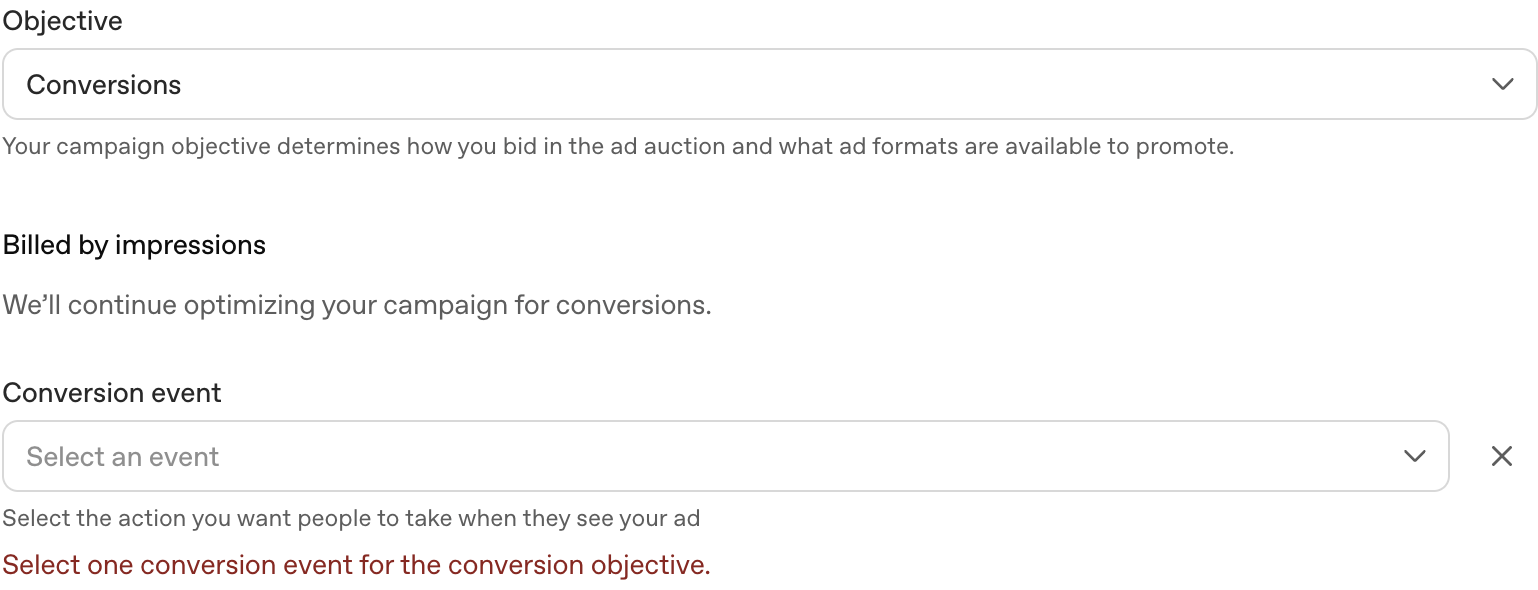
OpenAI says conversion optimisation with impression billing is now generally available and calls it "our recommended model for maximizing performance". The campaign still optimises toward your chosen conversion, but you pay for impressions rather than clicks — and optimisation counts conversions after someone sees an ad, not only after they click one.
The panel has already moved. Choosing the Conversions objective now shows a fixed billing line rather than a choice:
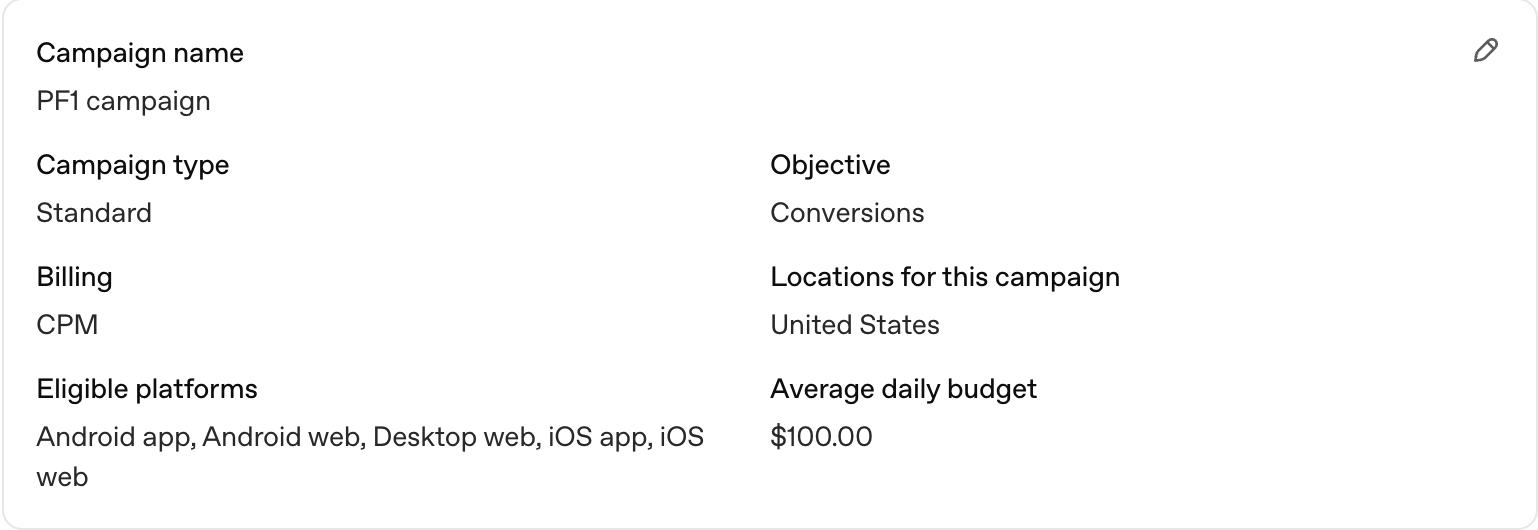
And the campaign Ads Manager drafts for you when you start a new one now defaults to exactly this setup — Conversions objective, CPM billing:
What it means for you. With click billing, broken tracking cost you efficiency. With impression billing, you are paying for every ad shown while the system learns from your conversion data. If that data is wrong, you pay to optimise toward the wrong thing. OpenAI's own help documentation lists healthy conversion tracking as a prerequisite, and notes two limits worth knowing before you build one:
- Custom events don't work. Conversion-optimised campaigns take a single standard event, such as
order_created. - You can't change your mind later. The objective, billing model and conversion event are all fixed once the campaign is created. A different choice means a new campaign.
The campaign setup guide has been updated to reflect this.
Attribution windows you can choose#
When you customise columns in Ads Manager, OpenAI says you can now pick a 7-, 14- or 30-day click window and a 0- or 1-day view window for conversion reporting, and the choice applies to every conversion column shown.
I couldn't open the column editor in an account with no campaigns, so this one is from the announcement rather than the panel.
What it means for you. Your ChatGPT Ads conversion count now depends on settings you choose. A 30-day click window with a 1-day view window will report more conversions than a 7-day window with no view window — for the same campaign on the same day. Before comparing Ads Manager to Shopify or Google Analytics, write down which windows you're looking at, and don't change them halfway through a test.
Five platforms instead of three#
Eligible platforms used to be iOS app, Android app and Web. They're now five separate options: Android app, Android web, Desktop web, iOS app and iOS web — shown at the top of this article. OpenAI says performance can be broken down the same way.
What it means for you. "Web" used to lump desktop and mobile browsers together, which made one problem easy to miss: a checkout that works on desktop and quietly fails on phones. You can now see conversion rate by platform, and switch off a platform that is spending without converting while you fix it.
An official Shopify app#
This is the change that matters most to this site's readers.
The app is called ChatGPT Ads, it's published by OpenAI, it's free, and it launched on the Shopify App Store on 3 September 2026. According to its listing it lets you:
- connect an existing ChatGPT ad account or create one from Shopify
- sync your product catalogue to Ads Manager automatically
- create ads from your product information
- run campaigns using a Shopify pixel and conversion events
- track performance without leaving Shopify
The email says it's for US-based merchants, with international availability planned later this month. When a German merchant reviewed it, OpenAI replied that it was "excited to bring the app to Germany very soon".
Two details from the listing are worth reading before you install:
It sets up server-side tracking itself. Asked about server-to-server tracking in a review, OpenAI replied that the app "does automatically set up a Shopify server pixel". That's good news if you have nothing in place. If you already send purchases through another app or your own integration, installing this one as well can report every order twice — deduplication only works when both copies share the same event ID, and two unrelated integrations won't agree on one. Pick one source per event.
It's early. At the time of writing the listing had three reviews, one of them reading "Doesn't work - please fix it". It asks for access to customer, product, marketing and analytics data.
What it means for you. For US stores, it's now the simplest way to get a catalogue into Ads Manager, and it answers much of the setup work described in ChatGPT product feed for Shopify — that article now carries a note saying so. Outside the US, and for stores that need control over how fields are mapped, the manual routes still apply until the app reaches your country. The field mapping guide is still the reference for what a correct feed looks like, whoever builds it.
HubSpot integration#
Businesses on HubSpot can connect a ChatGPT Ads account, create ads, track performance and follow up on leads inside HubSpot. For lead-generation businesses that means ad clicks and CRM records in one place. I haven't tested it; the details here are OpenAI's.
AI-suggested ad copy and images#
When creating an ad, you may be offered suggested copy and imagery based on your landing page and campaign objective, which you review and edit before adding. OpenAI says it's in testing, with wider availability "in the coming weeks".
Ads Manager already pre-fills a title and image from your landing page; this extends that. The important word in the announcement is review — suggestions don't go live until you accept them. That's not true of the next item.
Text customization: "opt in", but switched on#
The announcement describes text customization as something advertisers "can opt into", which adapts headlines and descriptions to the conversation and translates them into the user's language, adding that "advertisers remain in control".
In the panel today, on a brand-new campaign, the toggle is already on:
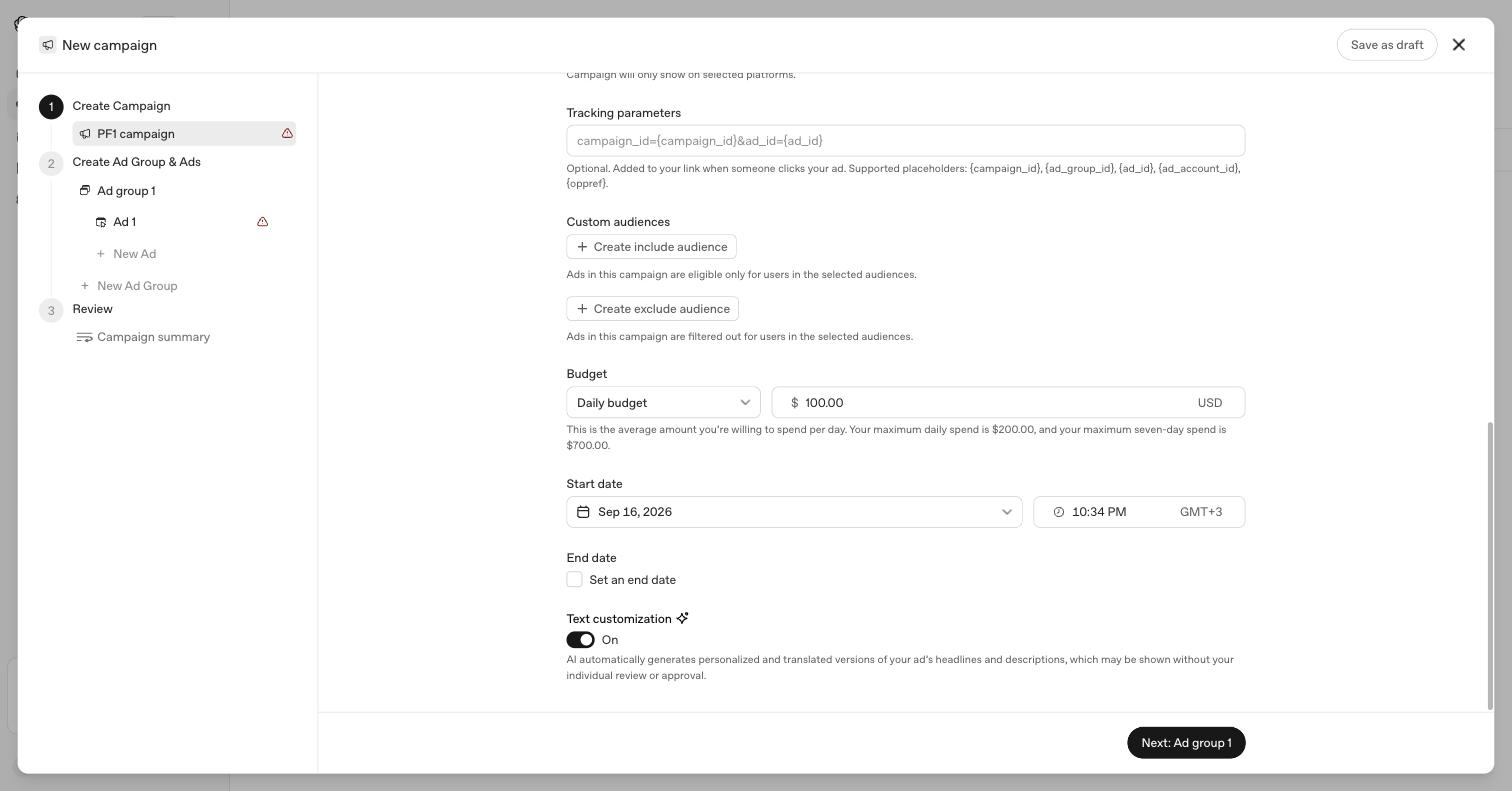
The description under it hasn't changed either: AI-generated versions of your headlines and descriptions "may be shown without your individual review or approval".
What it means for you. You are in control, but only if you use it. Check this toggle on every campaign you create. If your copy carries legal, medical, financial or pricing claims, turn it off.
Event Quality Score#
Event Quality Score gives each eligible pixel or Conversions API data source a score from 1 to 10, checks how much user data your events carry, and suggests fixes. It appears as an EQS column under Tools → Conversions:

The test pixel in this account shows a dash rather than a number. That isn't a zero: OpenAI's help documentation says a score can be unavailable when there isn't enough recent conversion activity, and treats that status as different from a score of zero. The score refreshes daily over seven complete days, so a fix won't show up the same day.
What it means for you. Now that the recommended campaign type bills by impressions and optimises on your conversion data, this is the number to check before you spend. OpenAI's guidance is explicit that you shouldn't try to game it — no invented identifiers, extra events or altered timestamps. The warnings behind the score are the useful part; the article on server-side tracking for Shopify covers the most common ones: missing click references, late server events and unmatched duplicates.
Sponsored Agents#
OpenAI is testing Sponsored Agents with select US advertisers. After clicking an ad, a user may be able to start a clearly labelled conversation with an agent run on the business's behalf, to ask follow-up questions and explore options.
There's nothing to set up yet unless you're in the test. It's worth watching, though, because it changes what an ad click leads to — from a landing page to a conversation. OpenAI's FAQ already states that when a user messages an advertiser through an ad, "the advertiser will only see the messages you send them directly".
Also changed, not in the email#
Two smaller things moved in the panel since last month:
- "Landing page query parameters" is now "Tracking parameters". Same placeholders —
{campaign_id},{ad_group_id},{ad_id},{ad_account_id},{oppref}— with new help text. - New campaigns can be saved as drafts. Previously closing the wizard meant discarding your work.
What to do this week#
- Check your Event Quality Score under Tools → Conversions before starting an impression-billed conversion campaign.
- On a US Shopify store, look at the official app — but if you already have pixel or server-side tracking, decide which one sends purchases before you install anything.
- Pick your attribution windows and note them before comparing reports.
- Look at results by platform, and switch off any platform that spends without converting.
- Check the text customization toggle on every new campaign.
I build LLM Pixels, a Shopify app for ChatGPT Ads conversion tracking — which makes the official app a competitor. I've tried to describe it as it is.